How to delete a watch face on Garmin
Removing a watch face takes a minute, but where you do it depends on how the face got onto the watch. Here are all the ways — in the phone app, on the watch, with Garmin Express and by cable — and what to do when a new face does not show up because the watch is full.
Why delete faces: the Connect IQ limit
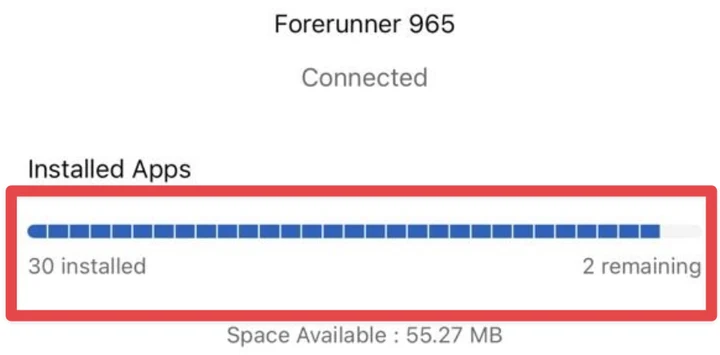
Every Garmin watch holds a limited number of Connect IQ items — watch faces, apps and data fields together, and the number depends on the model. When the watch is full, a newly installed face does not appear in the watch face list. The Connect IQ app on your phone shows how many places are left: Device → Installed Apps, «… installed / … remaining». Delete what you do not use, and the place is free again.
Faces from the Connect IQ Store: in the phone app
- Open the Connect IQ app on your phone.
- Tap Device and choose your watch.
- Open My Watch Faces.
- Pick the face you no longer use and delete (remove) it.
- Let the watch sync with the phone: the face disappears from the list on the watch.
On the watch itself
Some models let you delete a Connect IQ face right in the watch face list: hold UP / MENU on the current face (on touch models, touch and hold the screen), open Watch Face, pick the face and look for Delete. Newer models such as the Forerunner 965 have no such option — use the phone app or Garmin Express. Where the watch has its own Connect IQ Store app, you can also remove faces there, in the list of installed items.
With Garmin Express on Windows
- Install Garmin Express on a Windows computer and connect the watch with its USB cable.
- Choose your watch in Garmin Express.
- Open the section with the apps installed on the watch and remove the face.
- Disconnect the watch.
Faces installed by cable (a .prg file)
If you put a .prg file into GARMIN/Apps yourself, it depends on the model. Where the file stays in that folder, simply delete it: in File Explorer on Windows, or in «Files on the watch» of our USB file transfer in Chrome or Edge (it works on a Mac too). Newer models — fēnix 8 and 9, Forerunner 965 and 970 and others — hide the file once you unplug, so it is not in any folder any more: remove such a face with Garmin Express on Windows, or in the Connect IQ Store app on the watch if your model has one. Garmin Express on a Mac does not see these watches.
Faces that came with the watch
The built-in Garmin faces cannot be deleted and do not take Connect IQ places. You can only switch from them to another face.
Questions
Can I install a deleted face again?
Yes. A face from the Connect IQ Store stays in your Garmin account, so you can install it again from the store at any time — a paid face is not paid twice. Faces bought on watchfacekit.com stay in «My watch faces».
Why does a new face not show up on my watch?
Most often the watch is full: check «remaining» in the Connect IQ app (Device → Installed Apps) and delete a face you do not use. The other common reason is that the face was not built for your exact model — check the list of watches on the face page.
Can I delete a watch face on a Mac?
Faces from the store — yes, in the Connect IQ app on your phone, no computer needed. Garmin Express on a Mac does not see newer watches. For a .prg installed by cable on a model where the file stays in GARMIN/Apps, use our USB file transfer in Chrome or Edge.