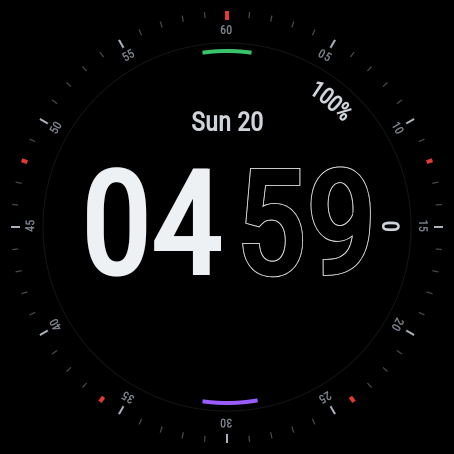
Actual Wear OS emulator captures. The fields shown depend on the selected data providers.
Domestique
Filled hours, outlined minutes and a crisp minute bezel. Domestique brings a sporty digital layout to Wear OS, with eight customizable complication slots and separate color choices for the time and accents.
Preview available. The Google Play release is being prepared; installation is not available yet.
| Platform | Wear OS 4 or later |
|---|---|
| Display | Round display · always-on mode |
| Data fields | 8 complication slots + battery |
| Colors | 9 accent colors + 9 time colors |
| Time format | Auto / 12-hour / 24-hour |
| Availability | Google Play release coming soon |
| Price | $2.99 |
Make it yours
Your data, your choice
Steps and notification count are configured by default. Choose providers for the other six slots; availability and permissions depend on the provider.
Two sets of colors
Choose the accent and time colors independently, with nine options for each.
A quieter always-on display
The always-on layout keeps a dimmed date and outlined time, without seconds or animations.
Device compatibility
Round watches running Wear OS 4 or later. These are examples that meet the platform requirements, not a list of physically tested devices.
Domestique is still in preview: tested on Wear OS 4 and 6 emulators. Compatibility with individual watches has not yet been confirmed; final availability will appear on Google Play.
Samsung Galaxy Watch
Google Pixel Watch
OnePlus Watch
Install the latest available system update first, especially on Galaxy Watch4, Watch5 and the original Pixel Watch. The installed Wear OS version matters, not just the model name.
Other Wear OS watches
Other round watches may meet the requirements if they run Wear OS 4 or later. They are not confirmed here; check the exact device in Google Play when the face is released. On dual-system watches, this face is intended for Wear OS mode.
Not compatible
Garmin Connect IQ, Apple Watch, older Samsung watches running Tizen, and watches still running Wear OS 3 or earlier cannot install this edition. A similar model name does not imply the same operating system.
Manufacturer specifications
Have a Garmin instead?
Domestique for Garmin →First Wear OS preview
Split digital time, eight complication slots, independent time and accent colors, and an always-on layout.
Wear OS guides
Choose a face, get it onto the right watch and make its data fields useful. Start with installation or pick a guide for your Galaxy Watch or Pixel Watch.