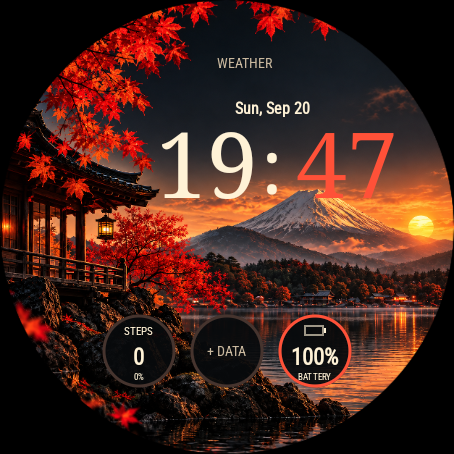
Actual Wear OS emulator captures. The animation is a short recording of falling leaves; the scenery is static and does not track real weather or time of day.
Autumn Fuji
A warm sunset over Mount Fuji, red maple trees and reflections on the lake. Large serif time sits above built-in steps and battery displays, with two fields for the data providers you choose.
Preview available. The Google Play release is being prepared; installation is not available yet.
| Platform | Wear OS 4 or later |
|---|---|
| Display | Round display · always-on mode |
| Data fields | Steps + battery + 2 configurable slots |
| Colors | Maple red / sunset gold / ivory |
| Time format | Auto / 12-hour / 24-hour |
| Availability | Google Play release coming soon |
| Price | $1.99 |
Make it yours
A little autumn in motion
Three maple leaves drift across the landscape for about five seconds after waking the watch. Tap the landscape to replay, or turn falling leaves off in the watch face editor.
Your time and daily essentials
The time follows your watch’s 12/24-hour setting, with manual overrides. Date, steps, progress toward the step goal and battery use live watch data. Step totals may differ from another health app.
Two fields, your providers
Choose compatible providers for the top and middle fields. Weather and calories require suitable installed providers and are not included by default. Empty slots show WEATHER and + DATA until configured.
Three accents and a quiet night view
Choose maple red, sunset gold or ivory. Always-on uses a black background with dim time and date only; scenery, leaves and data fields disappear.
Device compatibility
Round watches running Wear OS 4 or later. These are examples that meet the platform requirements, not a list of physically tested devices.
Autumn Fuji is still in preview: tested on Wear OS 4 and 6 emulators. Compatibility with individual watches has not yet been confirmed; final availability will appear on Google Play.
Samsung Galaxy Watch
Google Pixel Watch
OnePlus Watch
Install the latest available system update first, especially on Galaxy Watch4, Watch5 and the original Pixel Watch. The installed Wear OS version matters, not just the model name.
Other Wear OS watches
Other round watches may meet the requirements if they run Wear OS 4 or later. They are not confirmed here; check the exact device in Google Play when the face is released. On dual-system watches, this face is intended for Wear OS mode.
Not compatible
Garmin Connect IQ, Apple Watch, older Samsung watches running Tizen, and watches still running Wear OS 3 or earlier cannot install this edition. A similar model name does not imply the same operating system.
Manufacturer specifications
First Autumn Fuji preview
Autumn scenery, falling maple leaves, serif time, live steps and battery, two provider slots, three accents and a minimal always-on layout.
Wear OS guides
Choose a face, get it onto the right watch and make its data fields useful. Start with installation or pick a guide for your Galaxy Watch or Pixel Watch.