Matchstick Time for Wear OS$2.99
Coming soon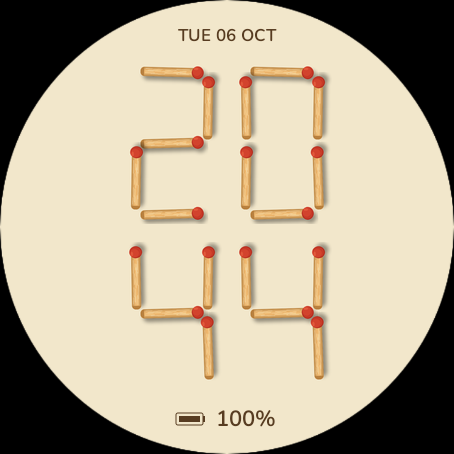
Browser preview with your local time and date. Battery, steps and notification values are examples, not readings from your watch. The installed face uses watch data.
Matchstick Time
Every digit is built from wooden matchsticks, each with one red head, laid out on a warm cream background. Hours sit on top, minutes below, the date above them and the watch battery at the bottom. A small table-top puzzle for round Wear OS watches.
Preview available. The Google Play release is being prepared; installation is not available yet. No companion app is required.
| Platform | Wear OS 4 or later |
|---|---|
| Display | Round display · outlined always-on |
| Data | Time, date and watch battery |
| Style | Wooden matches on cream |
| Time format | Auto / 12-hour / 24-hour |
| Availability | Google Play release coming soon |
| Price | $2.99 |
Make it yours
A puzzle you can read
Four digits in two rows: hours on top, minutes below. Every segment is a wooden match with a red head, and leading zeros stay in place, so 08:05 looks exactly as it would laid out on a table.
Date and battery, nothing else
The date sits at the top in English or Russian, with AM/PM in 12-hour mode; the watch battery sits at the bottom. Both can be switched off. No seconds, sensors, permissions or network connection.
Outlined always-on
Always-on draws pale match outlines on black and hides the battery. The layout moves by a pixel each minute.
Device compatibility
Round watches running Wear OS 4 or later. These are examples that meet the platform requirements, not a list of physically tested devices.
Matchstick Time is still in preview: tested on Wear OS 4 and 6 emulators. Compatibility with individual watches has not yet been confirmed; final availability will appear on Google Play.
Samsung Galaxy Watch
Google Pixel Watch
OnePlus Watch
Install the latest available system update first, especially on Galaxy Watch4, Watch5 and the original Pixel Watch. The installed Wear OS version matters, not just the model name.
Other Wear OS watches
Other round watches may meet the requirements if they run Wear OS 4 or later. They are not confirmed here; check the exact device in Google Play when the face is released. On dual-system watches, this face is intended for Wear OS mode.
Not compatible
Garmin Connect IQ, Apple Watch, older Samsung watches running Tizen, and watches still running Wear OS 3 or earlier cannot install this edition. A similar model name does not imply the same operating system.
Manufacturer specifications
First Matchstick Time Wear OS preview
Two-row matchstick time, English or Russian date, battery, 12/24-hour setting and an outlined always-on view, with a live browser preview. The Google Play release is being prepared.
Wear OS guides
Choose a face, get it onto the right watch and make its data fields useful. Start with installation or pick a guide for your Galaxy Watch or Pixel Watch.