Ember Mountain for Wear OSFree
Get it on Google Play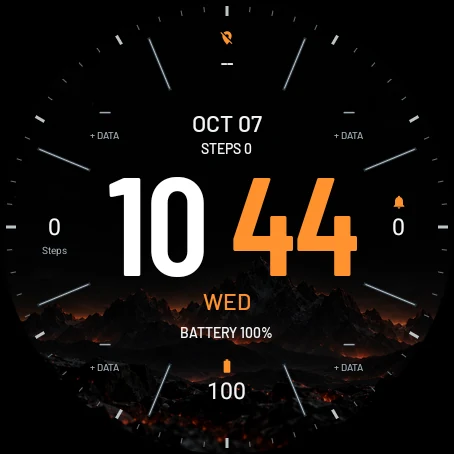
Browser preview with your local time and date. Battery, steps and notification values are examples, not readings from your watch. The installed face uses watch data.
Ember Mountain
Oversized digital time, white hours and glowing minutes, over a dark volcanic landscape. Ember Mountain brings our Garmin design to round Wear OS watches for free: four backgrounds that can rotate every 15 minutes, a minute ring and up to eight data fields around the dial.
Available on Google Play. Install it from the store on your phone; the watch picks it up after the sync.
Get it on Google Play| Platform | Wear OS 4 or later |
|---|---|
| Display | Round display · outlined always-on |
| Data | Up to 8 complications + steps and battery rows |
| Customization | 4 backgrounds + black, 10 accents, 5 brightness levels |
| Time format | Auto / 12-hour / 24-hour |
| Availability | On Google Play |
| Price | Free |
Make it yours
Four volcanic scenes
Coal, Ember cracks, Volcanic slope and Ember mountains, plain black, or a cycle through all four every 15 minutes. Five brightness levels dim the artwork behind the time.
Your data around the dial
Choose 4, 6, 8 or 10 fields. The eight slots around the ring take any complication your watch offers; sunrise and sunset, notifications, battery and steps are set by default. Ten fields add steps and battery rows inside the ring. Missing data shows --, never an invented value.
Ten accents, a quiet always-on
Blue, Lime, Orange, Red, Pink, Purple, Mint, Gold, Ice or White colors the minutes, the day and the field icons. Always-on keeps only an outlined time on black that moves slightly each minute. No permissions, network or companion app.
Device compatibility
Round watches running Wear OS 4 or later. These are examples that meet the platform requirements, not a list of physically tested devices.
Ember Mountain is on Google Play. The store shows the exact watches it installs on when you open the listing on your phone; the models below are the platform candidates, not a list of physically tested devices.
Samsung Galaxy Watch
Google Pixel Watch
OnePlus Watch
Install the latest available system update first, especially on Galaxy Watch4, Watch5 and the original Pixel Watch. The installed Wear OS version matters, not just the model name.
Other Wear OS watches
Other round watches may meet the requirements if they run Wear OS 4 or later. They are not confirmed here; check the exact device in Google Play when the face is released. On dual-system watches, this face is intended for Wear OS mode.
Not compatible
Garmin Connect IQ, Apple Watch, older Samsung watches running Tizen, and watches still running Wear OS 3 or earlier cannot install this edition. A similar model name does not imply the same operating system.
Manufacturer specifications
Have a Garmin instead?
Ember Mountain for Garmin →First free Ember Mountain Wear OS preview
Free round-screen adaptation with four volcanic backgrounds and a 15-minute cycle, five brightness levels, ten accents, 4–10 data fields with separators, 12/24-hour time and an outlined always-on view, with a live browser preview. The Google Play release is being prepared.
Wear OS guides
Choose a face, get it onto the right watch and make its data fields useful. Start with installation or pick a guide for your Galaxy Watch or Pixel Watch.